Setting the Stage for Remote Onboarding Success
This listicle provides eight remote onboarding best practices to help your business attract and retain top talent. Learn how to create a supportive and efficient onboarding experience that empowers remote employees from day one. Effective remote onboarding is crucial for building a thriving remote workforce. These best practices cover everything from pre-boarding and 30-60-90 day plans to virtual team-building and continuous feedback. Implementing these remote onboarding best practices will set your new hires—and your business—up for success.
1. Structured Pre-Boarding Process
A structured pre-boarding process is a crucial element of successful remote onboarding best practices. It bridges the gap between the moment a candidate accepts a job offer and their official start date. This period, often overlooked, provides a golden opportunity to set the stage for a positive and productive remote work experience. It involves planned interactions, resource sharing, and preliminary orientations designed to make new remote employees feel welcome, prepared, and connected before they even begin working. This proactive approach minimizes first-day jitters and accelerates the employee's integration into the company culture and workflows.

A well-defined pre-boarding process includes several key features: sending a welcome package to the new hire's home address, providing early access to company resources and documentation, introducing team members via email or messaging platforms, facilitating pre-first day technology setup and testing, and outlining a clear schedule and expectations for the first week. This structured approach ensures new hires feel valued and informed from the outset.
Companies like Buffer, GitLab, and Zapier have championed pre-boarding as a vital part of their remote onboarding strategies. Buffer, known for its transparent culture, sends personalized welcome packages with company swag and a welcome note from the CEO. GitLab grants early access to their comprehensive company handbook and team introduction videos. Zapier fosters early connections by scheduling brief virtual coffee meetings with key team members during the pre-boarding period. These examples demonstrate how pre-boarding can tangibly improve the new hire experience.
Why is Pre-Boarding Critical for Remote Teams?
For remote teams, pre-boarding is especially important because it helps overcome the inherent challenges of distance and lack of in-person interaction. It proactively builds rapport, fosters a sense of belonging, and ensures new hires have the tools and knowledge they need to hit the ground running. This is particularly beneficial for early-stage startups, SMEs, and enterprise companies seeking to optimize remote talent integration and reduce onboarding time. Learn more about Structured Pre-Boarding Process
Pros:
- Reduces first-day anxiety and uncertainty
- Allows new hires to feel connected before starting
- Creates time for hardware and software setup
- Increases employee engagement from the beginning
- Speeds up productivity ramp-up time
Cons:
- Requires additional planning and resources
- May create work before official employment begins
- Can be challenging to coordinate across different time zones
- Some companies have regulatory limitations on pre-start activities
Actionable Tips for Implementing a Successful Pre-Boarding Process:
- Create a digital pre-boarding checklist that new hires can access and track their progress.
- Schedule equipment delivery to arrive 3-5 days before the official start date.
- Assign a pre-boarding buddy, separate from the onboarding mentor, to provide informal support and answer questions.
- Set up a dedicated Slack channel for new hires starting in the same period to foster early connections and peer support.
- Send a personalized welcome video from the team and leadership to reinforce company culture and values.
By incorporating a structured pre-boarding process into your remote onboarding best practices, you can significantly improve the new hire experience, accelerate their integration, and contribute to a more engaged and productive remote workforce. This ultimately benefits all stakeholders, from HR and talent acquisition professionals to sales leaders and the new hires themselves.
2. Comprehensive Digital Onboarding Platform
A key element of successful remote onboarding best practices is the implementation of a comprehensive digital onboarding platform. This centralized system acts as a single source of truth for all onboarding activities, documentation, learning modules, and progress tracking, creating a structured and efficient experience for remote employees. By leveraging technology, companies can streamline the onboarding process, reduce administrative overhead, and ensure consistency for all new hires, regardless of location. This approach is particularly crucial for companies embracing remote work and seeking to scale efficiently.
How it Works:
A digital onboarding platform provides a structured pathway for new hires to navigate the initial stages of their employment. Instead of relying on scattered emails, shared drives, or in-person meetings, all essential information and tasks are accessible within the platform. New hires can complete training modules, review company policies, fill out necessary paperwork, and connect with colleagues, all at their own pace and from anywhere with an internet connection. Managers can monitor progress, provide feedback, and address any questions or concerns through the platform, ensuring a smooth and supportive transition.
Features & Benefits:
A robust digital onboarding platform typically includes features such as:
- Centralized Resource Library: Easy access to all essential documents, policies, and training materials.
- Interactive Training Modules: Engaging content that goes beyond static documents, fostering better knowledge retention.
- Progress Tracking Dashboard: Visibility into new hire progress for both the employee and manager.
- Task Completion Checklists: Clear expectations and accountability for completing required tasks.
- Built-in Feedback Mechanisms: Opportunities for two-way communication and continuous improvement.
- Integration with HR and IT Systems: Streamlined data management and automation of administrative tasks.
These features translate into tangible benefits:
- Consistent Onboarding Experience: All remote employees receive the same high-quality onboarding, regardless of their location or start date.
- Self-Paced Learning: Flexibility for new hires to learn at their own speed while still meeting deadlines.
- Increased Accountability: Progress tracking ensures that everyone stays on track and completes required tasks.
- Reduced Administrative Burden: Automation frees up HR and management time to focus on more strategic initiatives.
- Data-Driven Improvement: Platform data provides insights into onboarding effectiveness and areas for improvement.
Examples of Successful Implementation:
- Automattic: Uses a customized WordPress-based onboarding system where new hires complete real-world projects in their first few weeks.
- HubSpot: Their onboarding platform includes gamified learning elements and certification paths to enhance engagement.
- Trello: Creates personalized onboarding boards for each new employee with custom lists and cards for a tailored experience.
Pros & Cons:
Pros: Provides consistent onboarding, allows self-paced learning, creates accountability, reduces administrative burden, collects data for improvement.
Cons: Can be expensive to implement or maintain, may feel impersonal without proper human touchpoints, requires regular content updates, technical issues can disrupt the experience.
Tips for Effective Implementation:
- Balance self-guided learning with scheduled human interactions: While the platform provides structure, personal connection is still crucial. Schedule regular check-ins, team introductions, and mentoring sessions.
- Create short video walkthroughs of common tasks and processes: Visual guidance can be more effective than written instructions.
- Include knowledge checks and interactive elements to increase engagement: Keep new hires actively involved in the learning process.
- Design for mobile accessibility: Accommodate different work setups and preferences.
- Incorporate company culture elements throughout the digital experience: Showcase company values, mission, and team dynamics to foster a sense of belonging.
Popular Platforms:
While custom solutions exist, many companies leverage established platforms like Docebo, WorkRamp, BambooHR, and Enboarder to build their digital onboarding programs.
Why This Deserves Its Place in the List:
In today's increasingly remote work environment, a comprehensive digital onboarding platform is no longer a luxury but a necessity. It's a crucial component of remote onboarding best practices because it provides a scalable, consistent, and engaging experience for new hires, while also streamlining administrative processes and providing valuable data for continuous improvement. For early-stage startups to enterprise companies, leveraging a digital onboarding platform ensures new remote hires are equipped with the knowledge, resources, and support they need to succeed from day one.
3. Structured 30-60-90 Day Plans
One of the most effective remote onboarding best practices is the implementation of a structured 30-60-90 day plan. This detailed roadmap outlines clear expectations, goals, projects, and milestones for a new remote employee's first three months. It provides much-needed clarity on priorities and success metrics, while also creating natural check-in points for feedback and adjustment, fostering a sense of direction and purpose from day one. This is crucial in a remote setting where new hires can easily feel isolated or unsure of their role within the larger team.
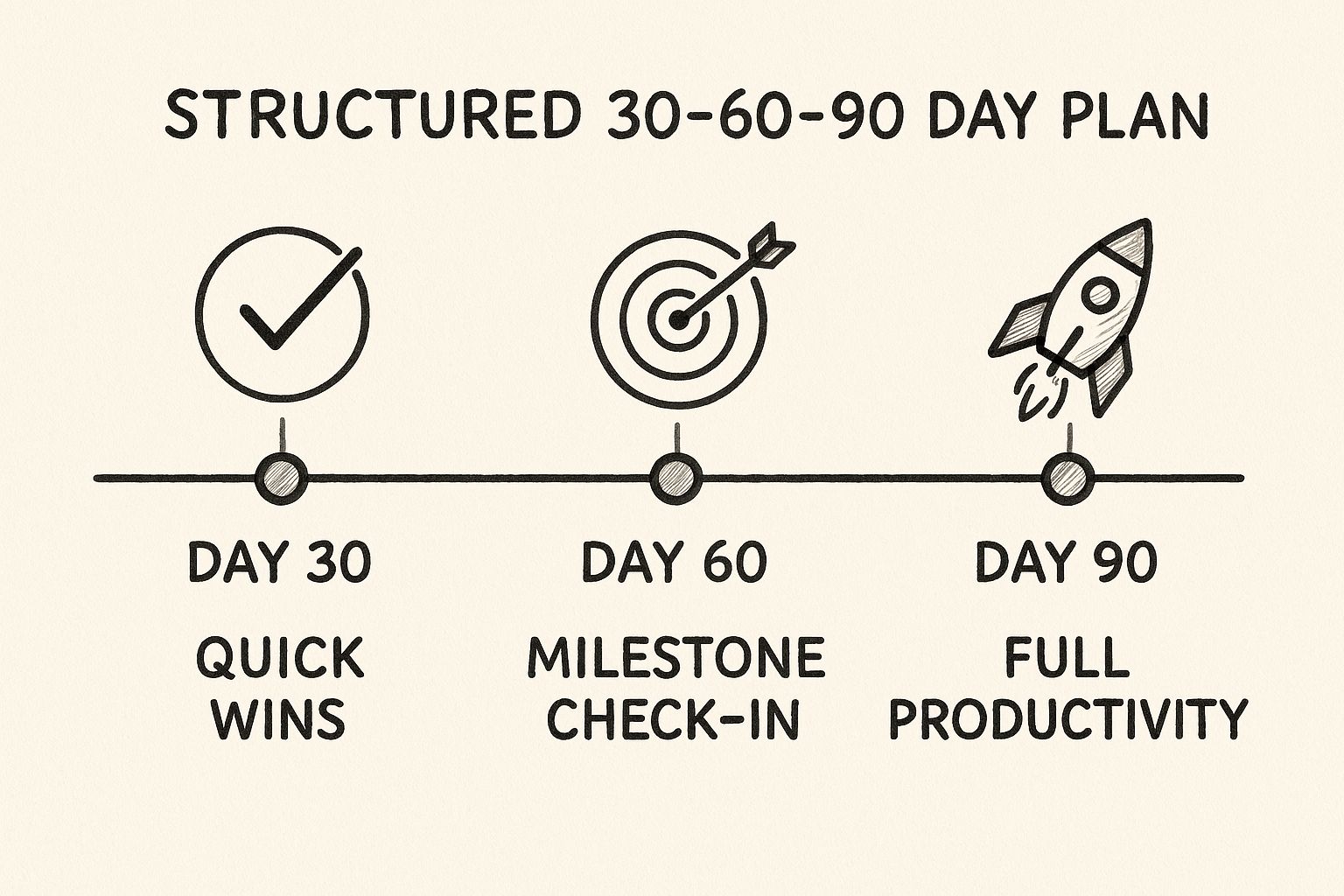
The infographic visualizes a typical 30-60-90 day plan timeline, highlighting the shift in focus from learning and absorbing information in the first 30 days, to contributing and collaborating in the next 30, and finally, to demonstrating increasing autonomy and impact in the final 30-day period. This structured approach provides a clear path for new hires to ramp up and become valuable members of the team.
A well-designed 30-60-90 day plan includes clearly defined short and medium-term objectives, progressive responsibility increases, regular milestone check-ins, and a balance between learning and contributing. It incorporates both role-specific goals, aligning the new hire with their team's immediate needs, and company-wide goals, fostering a sense of belonging and understanding of the broader organizational vision.
Examples of Successful Implementation:
- Salesforce: Creates customized 30-60-90 day plans with specific CRM learning objectives and customer engagement goals.
- LinkedIn: Plans include networking targets with colleagues across departments to build internal relationships.
- Shopify: Incorporates a real project with deliverables within the first 90 days to provide practical experience and assess performance.
When and Why to Use This Approach:
Structured 30-60-90 day plans are particularly valuable during remote onboarding as they bridge the physical distance gap and provide a framework for continuous communication and support. This approach is ideal for:
- Early-stage startups scaling revenue where clear roles and rapid onboarding are critical.
- Small and medium-sized businesses aiming to reduce sales hiring costs by improving new hire retention and productivity.
- Enterprise companies expanding remote teams and needing standardized onboarding procedures.
- HR and talent acquisition professionals focused on global hiring and consistent onboarding experiences.
- Sales leaders seeking to build high-performing remote sales teams and accelerate time to productivity.
Pros:
- Creates clarity and reduces uncertainty for new hires.
- Provides a framework for performance discussions.
- Helps remote employees understand priorities.
- Demonstrates investment in employee development.
- Facilitates earlier identification of challenges or misalignments.
Cons:
- May need frequent adjustments as priorities change.
- Can create pressure if timelines are too aggressive.
- Requires significant manager involvement to create and maintain.
- May not accommodate different learning styles or paces.
Actionable Tips:
- Co-create the plan: Involve the new hire in the development of the plan to foster ownership and ensure alignment.
- Balance skills and relationships: Include both technical skill development and relationship-building goals.
- Build in flexibility: Accommodate unexpected projects or shifting priorities.
- Regular check-ins: Schedule weekly check-ins during the first 30 days, then biweekly.
- Early wins: Include "quick wins" in the 30-day section to build confidence and momentum.
Popularized By:
- Liz Wiseman (author of "Rookie Smarts")
- Michael Watkins (author of "The First 90 Days")
- HubSpot's public 30-60-90 day templates
By incorporating structured 30-60-90 day plans into your remote onboarding best practices, you'll empower new hires to succeed, contribute meaningfully, and integrate smoothly into the company culture, regardless of location. This proactive approach not only benefits the individual but also strengthens the entire remote team and contributes to overall organizational success.
4. Virtual Buddy System
One of the most effective remote onboarding best practices is implementing a Virtual Buddy System. This formalized peer partnership program pairs new remote employees with experienced team members (buddies) who provide guidance, answer questions, and help them navigate the company culture outside of the direct reporting relationship. These buddies act as informal mentors and social connectors, easing the transition into a new role and company, especially crucial during the first few months in a remote setting.

This approach deserves a place in any best practices list because it directly addresses the challenges of remote onboarding, such as isolation and cultural integration. It offers dedicated peer support separate from the manager, allowing new hires a safe space to ask “obvious” questions they might hesitate to bring to their supervisor. Regular informal check-ins facilitate a smooth flow of information and provide a platform for continuous feedback. The buddy system also serves as a cultural and social orientation, connecting the new hire to the broader organizational network.
Features of a Successful Virtual Buddy System:
- Dedicated peer support: Provides a point of contact outside the direct management line.
- Regular informal check-ins: Creates opportunities for consistent communication and feedback.
- Safe space for 'obvious' questions: Encourages open dialogue without fear of judgment.
- Cultural and social orientation: Helps new hires understand the unwritten rules and norms of the company.
- Connection to broader organizational network: Introduces new hires to colleagues across different teams.
Pros:
- Reduces isolation for remote new hires: Fosters a sense of belonging and connection.
- Provides immediate answers to day-to-day questions: Speeds up the learning curve and boosts productivity.
- Accelerates cultural integration: Helps new hires understand and embrace company values and practices.
- Creates cross-team relationships: Builds stronger internal networks and communication.
- Develops leadership skills in buddy employees: Provides opportunities for mentorship and guidance.
Cons:
- Effectiveness depends on buddy selection and training: Requires careful planning and execution.
- Can create additional workload for experienced employees: Buddies need dedicated time for this responsibility.
- May lead to inconsistent experiences without proper guidelines: Standardized processes ensure a consistent experience for all new hires.
- Time zone differences can complicate buddy relationships: Requires flexibility and scheduling considerations.
Examples of Successful Implementation:
- Microsoft: Their buddy program includes structured discussion topics for each meeting, ensuring productive interactions.
- Airbnb: Matches new hires with buddies who share similar interests outside of work, facilitating personal connections.
- Shopify: Provides buddies with a small budget for virtual coffee meetings or lunch deliveries, fostering a more social and engaging experience. Learn more about Virtual Buddy System as it relates to remote sales team building.
Tips for Implementing a Virtual Buddy System:
- Select buddies who are strong culture carriers but not directly in the reporting line: This provides an objective perspective and avoids potential conflicts of interest.
- Provide training and guidelines to buddies on their role and responsibilities: Ensures consistency and sets clear expectations.
- Match buddies based on role similarity, interests, or complementary skills: Facilitates more meaningful connections and knowledge sharing.
- Create buddy meeting templates with suggested topics and questions: Provides structure and ensures key areas are covered.
- Recognize and reward effective buddies through formal acknowledgment programs: Shows appreciation for their efforts and encourages continued participation.
The Virtual Buddy System is a valuable tool for companies of all sizes – from early-stage startups scaling revenue to enterprise companies seeking remote sales expertise. By fostering connections and providing support, it significantly improves the remote onboarding experience, leading to faster integration, higher engagement, and ultimately, greater success for both the new hire and the organization. This approach, popularized by programs like Google's "Noogler" program, Microsoft's buddy system, and Buffer's "Three Buddy" approach, proves its effectiveness in creating a supportive and welcoming environment for remote employees.
5. Interactive Virtual Team-Building
Interactive virtual team-building is a crucial element of remote onboarding best practices, especially for organizations focused on scaling revenue and building strong remote teams. It involves purposefully designed synchronous virtual activities that help new remote employees build meaningful connections with their teammates through shared experiences. This goes beyond basic introductions and awkward icebreakers to create memorable interactions that foster trust and psychological safety within teams, which is essential for effective collaboration and ultimately, achieving business objectives. This is particularly valuable for early-stage startups, SMBs, and enterprise companies seeking to optimize remote team performance.
Instead of simply listing names and job titles, interactive virtual team-building encourages genuine connection. Think facilitated virtual social events, team games and collaborative challenges, structured but informal conversations, shared virtual experiences, and a regular cadence of connection opportunities. These activities transform the onboarding experience from a transactional process to a welcoming and engaging introduction to the company culture.
Why This Matters for Remote Onboarding Best Practices:
In a remote environment, building rapport and fostering a sense of belonging can be challenging. Interactive team-building activities bridge this gap by accelerating relationship building and creating a shared sense of community. This directly impacts remote team performance and contributes to a positive onboarding experience, reducing early attrition and improving employee satisfaction. For sales teams specifically, where strong relationships are critical for success, this type of onboarding can significantly impact revenue generation.
Features and Benefits:
- Facilitated virtual social events: These provide structured opportunities for interaction, ensuring everyone feels included and engaged.
- Team games and collaborative challenges: These create shared experiences and inside jokes, fostering camaraderie and a sense of belonging.
- Structured but informal conversations: These allow for deeper connections beyond superficial introductions.
- Shared virtual experiences: Activities like online escape rooms or virtual museum tours provide a fun and engaging way to connect.
- Regular cadence of connection opportunities: Consistent team-building activities reinforce relationships and prevent new hires from feeling isolated.
Pros:
- Accelerates relationship building in remote environments
- Creates shared experiences and inside jokes, strengthening team bonds
- Helps new hires understand team dynamics and communication styles more quickly
- Builds psychological safety, encouraging open communication and collaboration
- Makes company culture tangible through interactions and shared experiences
Cons:
- Can feel forced if not well-designed, leading to disengagement.
- Time zone challenges for global teams require careful planning and consideration.
- May not appeal to all personality types; offering a variety of activities can mitigate this.
- Technical issues can disrupt the experience; ensure reliable technology and support.
- Requires ongoing planning and facilitation to maintain momentum and effectiveness.
Examples of Successful Implementation:
- Gitlab: Hosts virtual 'show and tell' sessions where team members share personal interests or hobbies.
- InVision: Conducts virtual scavenger hunts where teams solve puzzles together.
- Hotjar: Organizes remote cooking classes where ingredients are shipped to team members.
Actionable Tips for Implementation:
- Schedule team-building activities within the first two weeks: Early engagement sets a positive tone for the onboarding experience.
- Mix smaller group activities with whole-team events: This caters to different comfort levels and allows for more personalized interactions.
- Use breakout rooms for more intimate conversations: Breakout rooms facilitate smaller group discussions and encourage participation.
- Incorporate company history and values in an interactive format: This helps new hires understand the company culture and connect with its mission.
- Create low-pressure opportunities for new hires to contribute and share: This empowers new team members and fosters a sense of belonging.
Popularized By:
- Donut's Slack integration: Facilitates virtual coffee matchmaking for informal connections. (https://www.donut.com/)
- Teambuilding.com: Offers a wide range of virtual team building experiences. (https://teambuilding.com/)
- MuseumHack: Provides engaging virtual team building programs based on museum collections. (https://museumhack.com/)
- Jackbox Games: Offers a variety of party games ideal for remote team activities. (https://www.jackboxgames.com/)
By prioritizing interactive virtual team-building as a key component of remote onboarding best practices, organizations can cultivate strong remote teams, boost employee morale, and ultimately, drive business success. It's an investment that pays dividends in terms of increased collaboration, improved communication, and a thriving remote work environment.
6. Asynchronous Onboarding Components
Asynchronous onboarding components are essential for effective remote onboarding best practices, especially for organizations embracing a distributed workforce. This approach leverages self-paced training materials, recorded presentations, and documentation that new remote employees can consume on their own schedule, regardless of their time zone. This respects the flexibility inherent in remote work while ensuring comprehensive coverage of important information without relying solely on constant synchronous meetings. This method is crucial for early-stage startups scaling revenue, SMBs reducing hiring costs, enterprise companies seeking remote expertise, HR professionals focused on global hiring, and sales leaders building remote teams.
How it Works:
Asynchronous onboarding relies on a library of resources that new hires can access and digest at their own pace. This typically includes:
- Video libraries of recorded presentations: Walkthroughs of company systems, introductions to team members, and explanations of key processes.
- Self-paced learning modules: Structured courses covering specific topics, often with interactive elements and progress tracking.
- Interactive documentation: Searchable wikis, FAQs, and how-to guides that provide readily available answers to common questions.
- Knowledge checks and assessments: Quizzes and tests to ensure comprehension and identify areas needing further clarification.
- Searchable company wiki or knowledge base: A central repository of information that employees can easily access and search.
Benefits of Asynchronous Onboarding:
- Accommodates different time zones and working styles: A major advantage for distributed teams, allowing everyone to onboard effectively regardless of location.
- Allows new hires to review information multiple times: Reinforces learning and ensures better retention of key concepts.
- Reduces meeting fatigue during onboarding: Avoids overwhelming new hires with back-to-back synchronous sessions.
- Creates consistent information delivery: Ensures all new hires receive the same core information, regardless of their onboarding cohort.
- Scales efficiently as company grows: The same materials can be used repeatedly, reducing the need for constant live training sessions.
Challenges of Asynchronous Onboarding:
- Lacks immediate feedback and question opportunities: New hires may have questions that aren't immediately addressed.
- May feel isolating without sufficient human touchpoints: It's important to balance asynchronous content with opportunities for interaction and connection.
- Requires significant upfront content creation: Developing high-quality asynchronous materials takes time and resources.
- Can be difficult to ensure completion and comprehension: Tracking progress and understanding can be challenging without direct interaction.
- May not convey company culture as effectively: While videos and written materials can help, the nuances of company culture are often best conveyed through personal interactions.
Examples of Successful Implementation:
- Doist maintains a comprehensive Notion workspace with recorded walkthroughs of all company systems.
- Basecamp's onboarding includes a series of asynchronous challenges completed in their own product.
- ConvertKit provides a 'choose your own adventure' style documentation for different learning paths.
Actionable Tips:
- Break content into digestible 5-15 minute segments: Keeps learners engaged and prevents information overload.
- Create clear learning paths with recommended sequences: Guides new hires through the material in a logical order.
- Include interactive elements like quizzes and assignments: Reinforces learning and provides opportunities for practical application.
- Establish async communication channels for questions (like dedicated Slack channels): Provides a forum for new hires to ask questions and receive timely support.
- Balance async content with scheduled synchronous discussion sessions: Creates opportunities for connection, feedback, and live Q&A.
Why Asynchronous Onboarding Deserves its Place:
In today’s increasingly remote and distributed work environment, asynchronous onboarding is no longer a nice-to-have but a necessity. It offers a scalable, flexible, and efficient way to onboard new employees, ensuring they have access to the information they need, when they need it.
Learn more about Asynchronous Onboarding Components This link provides valuable insights into using animation and storytelling in video content, which can be highly effective for asynchronous onboarding materials.
Popularized By:
GitLab's all-remote documentation approach, Loom for creating video walkthroughs, Notion for comprehensive knowledge bases, and Almanac for collaborative documentation have all contributed to the popularization and refinement of asynchronous onboarding best practices.
7. Technology and Equipment Fast Track
One of the most crucial aspects of successful remote onboarding is ensuring your new hires have the tools they need to succeed from day one. A Technology and Equipment Fast Track process streamlines the delivery of essential hardware, software access, accounts, and technical support, eliminating technology barriers and fostering a professional remote work environment. This approach prioritizes productivity from the start and demonstrates a company's commitment to its employees.

This method involves pre-configuring hardware (laptops, monitors, keyboards, etc.) and shipping it directly to employees before their start date. It also includes providing virtual IT support for setup and troubleshooting, ensuring seamless access to all necessary systems through single sign-on, and providing a digital welcome kit with clear setup instructions. Some companies even offer a stipend for home office equipment, empowering employees to personalize their workspaces. This fast track deserves its place in the list of remote onboarding best practices because it directly addresses the potential for technical roadblocks that can hinder productivity and negatively impact a new hire's initial experience.
Features of a Technology and Equipment Fast Track:
- Pre-configured hardware shipped directly to employees
- Virtual IT support for setup and troubleshooting
- Single sign-on access to all necessary systems
- Digital welcome kit with setup instructions
- Stipend for home office equipment
Pros:
- Eliminates technology barriers to productivity
- Demonstrates company investment in employee success
- Creates a professional home work environment
- Reduces frustration during critical first impressions
- Ensures security and compliance from day one
Cons:
- Can be costly to implement comprehensively
- Logistical challenges for international employees
- May create equity issues if not standardized
- Requires coordination between multiple departments
- Hardware damage or loss can be complicated to address
Examples of Successful Implementation:
- Shopify: Provides a $1,000 stipend for home office setup along with company-issued technology.
- Twitter: Uses a digital portal where new hires select their equipment before starting.
- Webflow: Ships pre-configured laptops with personalized welcome notes from the IT team.
Actionable Tips for Implementation:
- Create a technology survey: Understand new hire needs before shipping equipment. This helps tailor the setup to individual roles and preferences.
- Schedule a dedicated IT onboarding session: Within the first two days, provide a live session with IT support to address any setup issues and answer questions.
- Provide recommended home office setups: Offer ergonomic guidelines and suggestions for creating a productive and comfortable workspace.
- Create step-by-step visual guides: Develop easy-to-follow guides for common setup procedures, software installations, and troubleshooting steps.
- Establish a quick-response system: Implement a system for urgent technology issues, ensuring new hires have immediate support when they need it.
When and Why to Use This Approach:
This approach is particularly beneficial for companies with a large remote workforce or those rapidly scaling their remote operations. It’s essential for roles heavily reliant on technology, such as sales, engineering, and design. By proactively addressing technology needs, companies can ensure a smooth transition for new hires, minimize downtime, and foster a positive first impression. This is especially valuable for early-stage startups, SMBs, and enterprise companies seeking to optimize remote onboarding and reduce friction for new remote sales teams and global hires. This method streamlines the onboarding process, demonstrates a commitment to employee success, and contributes to a more productive and engaged remote workforce, making it a key component of any robust remote onboarding best practices strategy.
Popularized By:
- Apple's employee technology program
- Google's remote work technology standards
- Rippling's IT management platform
- Firstbase's remote work equipment management service
8. Continuous Feedback Loops
Effective remote onboarding best practices go beyond simply delivering information; they prioritize ongoing engagement and two-way communication. A critical component of this is establishing continuous feedback loops throughout the entire onboarding process. This systematic approach to gathering, providing, and acting on feedback helps identify and address challenges or opportunities for improvement quickly, rather than waiting for formal reviews weeks or months down the line.
This continuous feedback system should incorporate various channels and methods. Regular structured 1:1 meetings provide dedicated time for managers and new hires to connect, discuss progress, and address any roadblocks. Pulse surveys, deployed at key onboarding milestones, offer a quick snapshot of the new hire experience and can uncover trends or areas needing attention. Encouraging multi-directional feedback – from managers, peers, and even cross-functional team members – provides a more holistic perspective on the new hire's integration and performance. Real-time communication channels, such as instant messaging platforms, offer a readily available avenue for quick questions and clarifications. Finally, early performance alignment conversations ensure that expectations are clear and that the new hire understands how their contributions fit into the larger organizational goals.
Several companies have successfully implemented continuous feedback loops within their remote onboarding programs. For example, Stripe conducts a 'first week retrospective' where new hires provide detailed feedback on their initial experience. Atlassian uses a traffic light system (green/yellow/red) for daily check-ins during the first month, providing a simple yet effective way for new hires to communicate their status. GitLab takes a transparent approach by maintaining public onboarding issue tickets where new hires document their experience and suggest improvements, fostering a collaborative environment and benefiting future hires.
Why Continuous Feedback Loops are Essential for Remote Onboarding Best Practices:
In a remote setting, where in-person interactions are limited, continuous feedback becomes even more crucial. It helps build rapport, fosters a sense of belonging, and ensures new hires feel supported. By proactively seeking feedback, organizations demonstrate a commitment to employee success and cultivate a feedback-rich culture from day one. To streamline communication and manage expectations during the initial stages of onboarding, especially during those first few busy days, consider setting up automated out-of-office replies for new hires. This, adapted from Atlassian's own practices, ensures that anyone trying to contact them is aware of their onboarding status and expected response time.
Pros:
- Identifies and addresses issues before they escalate
- Creates psychological safety through open communication
- Helps refine the onboarding process continuously
- Demonstrates commitment to employee success
- Builds a feedback culture from day one
Cons:
- Can feel overwhelming if too frequent or unstructured
- Requires manager commitment and follow-through
- May not yield honest feedback if psychological safety is low
- Difficult to standardize across different teams and managers
- Time-consuming to implement comprehensively
Tips for Implementing Continuous Feedback Loops:
- Create structured templates for 1:1s with suggested topics for each week.
- Use anonymous surveys for sensitive feedback about the onboarding experience.
- Establish specific onboarding success metrics and review them regularly.
- Schedule 15-minute daily check-ins for the first week, then gradually reduce frequency.
- Document feedback patterns to improve the process for future hires.
Popularized by tools like Culture Amp's onboarding surveys, 15Five's continuous performance management approach, and Officevibe's pulse surveys, along with frameworks like Kim Scott's Radical Candor, continuous feedback has become a cornerstone of successful onboarding programs. By implementing these best practices, organizations can create a more engaging, supportive, and ultimately more effective remote onboarding experience for their new hires. This is particularly beneficial for fast-growing startups, SMBs seeking cost-effective hiring solutions, enterprise companies expanding globally, HR professionals, and sales leaders building remote teams, all of whom benefit from a streamlined and effective onboarding process.
Top 8 Remote Onboarding Best Practices Comparison
| Best Practice | Implementation Complexity 🔄 | Resource Requirements ⚡ | Expected Outcomes 📊 | Ideal Use Cases 💡 | Key Advantages ⭐ |
|---|---|---|---|---|---|
| Structured Pre-Boarding Process | Medium; requires coordination and planning | Moderate; needs staff time, logistics, materials | Faster productivity ramp-up; reduced first-day anxiety | New hires needing early engagement; distributed teams | Early connection; smooth tech setup; increased engagement |
| Comprehensive Digital Onboarding Platform | High; tech setup and content maintenance | High; investment in platform, content creation | Consistent onboarding; tracked progress | Large remote teams; companies valuing self-paced, scalable onboarding | Centralized resources; automation; accountability |
| Structured 30-60-90 Day Plans | Medium; requires manager involvement | Low to moderate; mainly planning and coaching | Clear expectations; early performance clarity | Roles with clear milestones; manager-led onboarding | Clarity; development focus; progress measurement |
| Virtual Buddy System | Low to medium; depends on buddy management | Low; peer volunteer or assigned roles | Reduced isolation; cultural integration | New hires needing social support; remote cultural onboarding | Peer support; informal mentoring; cross-team networking |
| Interactive Virtual Team-Building | Medium; needs facilitation and planning | Moderate; event facilitation and tools | Stronger team bonds; psychological safety | Building trust and culture remotely; global teams | Accelerates relationship building; fun, memorable events |
| Asynchronous Onboarding Components | Low to medium; content development upfront | Moderate; video and documentation creation | Flexible learning; scalable information delivery | Global teams across time zones; documentation-focused orgs | Time zone friendly; reduces meeting load; consistent info |
| Technology and Equipment Fast Track | Medium; logistical coordination required | Moderate to high; hardware and IT support | Immediate productivity; professional work setup | Remote hires needing full tech readiness on day one | Removes tech barriers; supports security; boosts morale |
| Continuous Feedback Loops | Medium to high; requires ongoing commitment | Moderate; manager time and tooling | Early issue detection; improved onboarding process | Companies focusing on feedback culture and retention | Builds trust; continuous improvement; timely support |
Reaping the Rewards of Effective Remote Onboarding
Implementing these remote onboarding best practices, from structured pre-boarding and 30-60-90 day plans to virtual team-building and continuous feedback, is crucial for setting your remote team up for success. Mastering these approaches translates directly to faster time-to-productivity, higher employee engagement, and improved retention rates. By prioritizing a comprehensive digital onboarding experience that incorporates asynchronous components and provides the necessary technology and equipment quickly, you're not just checking boxes; you're building a strong foundation for a thriving, distributed workforce. Remember, a well-structured onboarding process, informed by remote onboarding best practices, fosters a positive employee experience from day one, setting the stage for long-term growth and achievement.
By embracing these remote onboarding best practices, you invest in your employees’ success and, consequently, the success of your organization. Ready to streamline your remote onboarding process and build a high-performing team? Explore how AboutHire can help you implement these best practices, focusing on specialized roles and cultural fit for a truly effective remote team. Visit AboutHire today to discover how we can transform your remote onboarding experience.